Frequently Asked Questions
FAQ's
After you have generated a
quote and the customer accepts the quote, then click on accept quote button.
Statements are always ready for subscribed users. You can download a
The customer must have at least one (1) invoice, which must not be voided.
On the left menu, click on Customers, next to the customer's name, then click on 3 months button for quick access, or click the button next to the customer's name for more options.
3, 6 or 12 months balance statement for your customers.The customer must have at least one (1) invoice, which must not be voided.
On the left menu, click on Customers, next to the customer's name, then click on 3 months button for quick access, or click the button next to the customer's name for more options.
Yes, you can!
Next to each customers on the list customers page, click on
Next to each customers on the list customers page, click on
Capture / View Payments button to capture their payment details.
Navigate to the
Capture the payment detail as accurately as possible, and include the reference and date when is reflected on your bank statement so that your customer can the information on the statement.
Capture / View Payments page.Capture the payment detail as accurately as possible, and include the reference and date when is reflected on your bank statement so that your customer can the information on the statement.
Yes, you can!
Go to the Customers list page, then click on the customer's
On the
Go to the Customers list page, then click on the customer's
invoices button 6. On the
list invoices page, under the void column on the table, there will be to mark that invoice as void.
Subscribed users have the feaure unlocked to automatically send your customers their statements if they have not closed all the invoices they have
not paid yet into your account.
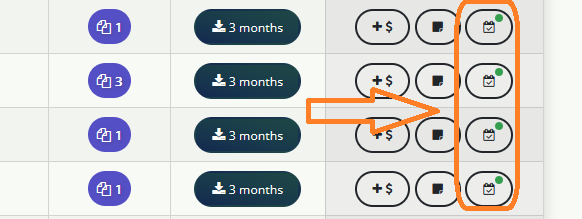
Go to the Customers page, then next to the desired customer, click on the the following icon shown on the below illustration.
Go to the Customers page, then next to the desired customer, click on the the following icon shown on the below illustration.